News

How Wireless Keyboards Improve Productivity and User Experience

2026-04-13 0 Leave me a message

Abstract

Wireless keyboards have become a core input device in modern computing environments, replacing traditional wired peripherals with flexible, portable, and clutter-free alternatives. This article explores how wireless keyboards function, their structural components, connection technologies, benefits, limitations, and practical selection strategies for different user scenarios. It is designed to help users understand key decision factors and solve common usability problems such as lag, connectivity instability, ergonomic discomfort, and battery inefficiency.

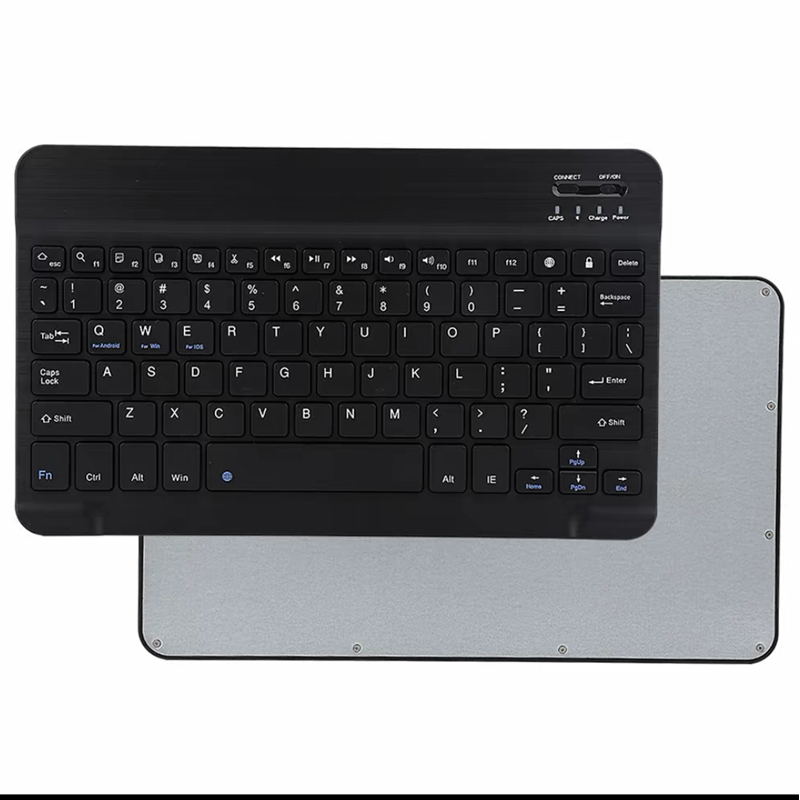
Office Bluetooth Keyboard

Table of Contents


Article Outline

This article is structured to provide a technical yet practical understanding of wireless keyboards. It begins with foundational concepts, moves into communication technologies and engineering design, evaluates real-world advantages and limitations, and concludes with a decision-making guide and maintenance strategies.


1. Overview of Wireless Keyboards

A wireless keyboard is an input device that communicates with computers, tablets, or smart devices without a physical cable. Instead of direct electrical connection, it relies on wireless transmission protocols to send keystroke signals to a receiver or built-in module.

Modern wireless keyboards are widely used in offices, gaming setups, educational environments, and mobile workstations. Their design focuses on portability, ergonomic comfort, and workspace efficiency.

Guangzhou Purio Technology Co., Ltd. specializes in designing and manufacturing advanced keyboard solutions, including wireless models engineered for both productivity and durability.


2. Core Technology Behind Wireless Keyboards

Wireless keyboards rely on several communication technologies. The two most common are 2.4GHz RF (radio frequency) and Bluetooth connectivity. Each method has unique strengths depending on usage scenarios.

  • 2.4GHz RF Technology: Uses a USB receiver (dongle) to connect the keyboard to a device. It provides stable, low-latency performance.
  • Bluetooth Technology: Connects directly to built-in Bluetooth-enabled devices without a dongle.

Inside the keyboard, a microcontroller processes keystrokes and converts them into digital signals. These signals are transmitted wirelessly to the paired device, where they are interpreted as input commands.

Power efficiency is another key engineering aspect. Most wireless keyboards use energy-saving chips and sleep modes to extend battery life, sometimes lasting months or even years on a single charge or battery set.


3. Key Benefits for Daily Use

Wireless keyboards are preferred not only for aesthetic reasons but also for functional advantages that directly impact productivity and comfort.

Benefit Description
Mobility Allows users to type from a distance or switch devices easily.
Clutter-Free Workspace Eliminates cable mess, improving desk organization.
Multi-Device Switching Some models support pairing with multiple devices simultaneously.
Ergonomic Flexibility Enables adjustable positioning for better posture.

These advantages make wireless keyboards especially suitable for remote workers, digital creatives, and professionals who value efficient workflows.


4. Common User Challenges and Solutions

Despite their benefits, wireless keyboards can present certain challenges. Understanding these issues helps users make informed decisions and improve performance.

  • Input Lag: Usually caused by interference or low battery. Solution: switch to 2.4GHz or recharge device.
  • Connection Drops: Often due to distance or obstacles. Solution: maintain close proximity to receiver.
  • Battery Dependency: Requires periodic charging or replacement. Solution: choose rechargeable models.
  • Compatibility Issues: Older devices may not support Bluetooth versions. Solution: check device specifications before purchase.

Manufacturers like Guangzhou Purio Technology Co., Ltd. address these issues through improved chipsets, optimized firmware, and enhanced power management systems.


5. Wireless vs Wired Keyboards

Feature Wireless Keyboard Wired Keyboard
Portability High Low
Latency Low (modern models) Very Low
Workspace Cleanliness Excellent Moderate
Power Requirement Battery required No battery required

While wired keyboards remain preferred in ultra-low-latency environments such as competitive gaming or specialized industrial applications, wireless models dominate everyday office and home usage due to flexibility.


6. How to Choose the Right Wireless Keyboard

Selecting the right wireless keyboard depends on usage habits, device compatibility, and ergonomic requirements. Below are key factors to consider:

  • Connection Type: Choose Bluetooth for versatility or 2.4GHz for stability.
  • Key Switch Type: Mechanical for tactile feedback, membrane for quiet operation.
  • Battery Life: Long-lasting battery reduces maintenance frequency.
  • Layout Design: Full-size, tenkeyless, or compact depending on workspace.
  • Build Quality: Durable materials improve long-term reliability.

Reference product design insights can be found at Guangzhou Purio Technology Co., Ltd. Wireless Keyboard Product Page, which showcases multiple engineering approaches and functional configurations.


7. Maintenance and Optimization Tips

Proper maintenance ensures stable performance and extends device lifespan.

  • Regularly clean key surfaces to prevent dust buildup.
  • Keep firmware updated if supported by manufacturer software.
  • Avoid placing metal objects near the receiver to reduce interference.
  • Charge batteries before complete depletion to maintain health.

Optimized usage habits can significantly reduce input delays and connectivity issues, ensuring a smoother typing experience over time.


8. Frequently Asked Questions

Q1: Do wireless keyboards suffer from delay?

Modern wireless keyboards use optimized transmission protocols that minimize latency, making delays negligible for most applications.

Q2: Can I use one keyboard for multiple devices?

Yes, many wireless keyboards support multi-device pairing via Bluetooth or switchable channels.

Q3: How long does the battery last?

Battery life varies by model, but efficient designs can last from several weeks to over a year depending on usage intensity.

Q4: Are wireless keyboards suitable for gaming?

Yes, especially high-performance 2.4GHz models, though wired keyboards may still be preferred in competitive esports environments.


Conclusion

Wireless keyboards represent a significant evolution in input device technology, combining convenience, portability, and modern engineering efficiency. By understanding their working principles, advantages, and selection criteria, users can make informed choices that enhance both productivity and comfort.

Guangzhou Purio Technology Co., Ltd. continues to develop high-quality wireless keyboard solutions designed to meet diverse global user requirements, from office professionals to advanced industrial applications.

If you are looking for reliable, high-performance keyboard solutions tailored to your needs, contact us today to explore customized options and professional support.

Related News
Leave me a message
X
We use cookies to offer you a better browsing experience, analyze site traffic and personalize content. By using this site, you agree to our use of cookies. Privacy Policy
Reject Accept